


TRON Wallet Guide: Types, USDT TRC-20, and Fees


Table of contents
The TRON wallet is responsible for managing the private key for a TRON address. The two major alternatives are hardware wallets like Ledger or Trezor and software wallets like TronLink and Trust Wallet. TRON's developer documentation identifies TronLink, Trust Wallet, imToken, and Ledger as ecosystem wallets, and mentions that wallets don't store assets, which are always on the blockchain. Sending USDT on TRON (TRC-20) has a fee in TRX which is generally higher than expected – the fee model page estimates approximately 6.85 TRX to an address that has held USDT before and about 13.45 TRX to a new address where energy is burned.
This article will provide information on types of wallets, differences between hardware and software options, what TRC-20 fee depends on, and important safety checks to consider. Note that this article does not identify the best wallet. Fees and supported assets change, and live information should be verified.
Types of TRON Wallets
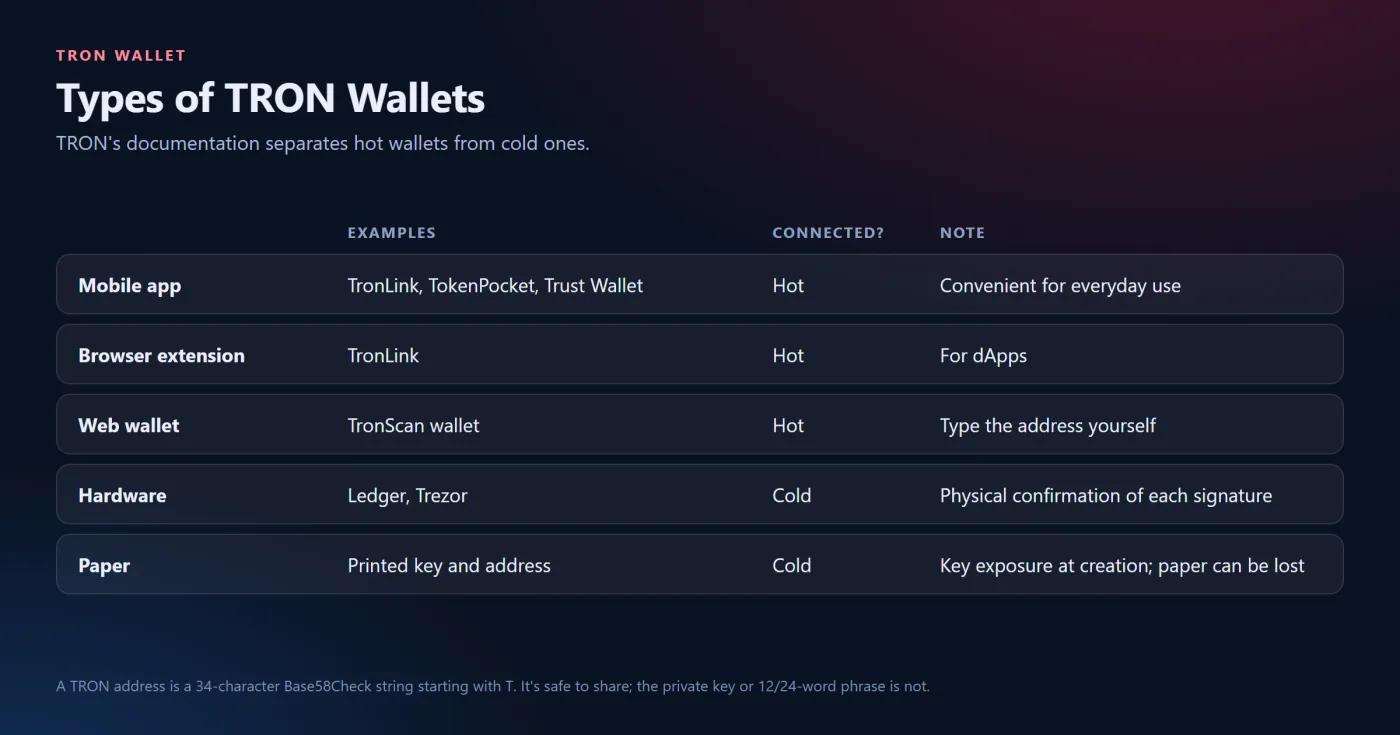
The TRON documentation separates hot wallets that are connected to the internet from cold wallets that aren't. Hot wallets include mobile applications (TronLink, TokenPocket, Trust Wallet), browser extension (TronLink), and web wallet (the TronScan wallet). Cold wallets include hardware wallets where Ledger requires physical confirmation of each signature and paper wallet which is the key and address printed on paper. The same documentation page states that TRON address is usually a 34-character Base58Check string starting with letter T and that can be shared publicly, and the private key or the 12 or 24-word mnemonic provides full access to the account.
Software Wallets
-
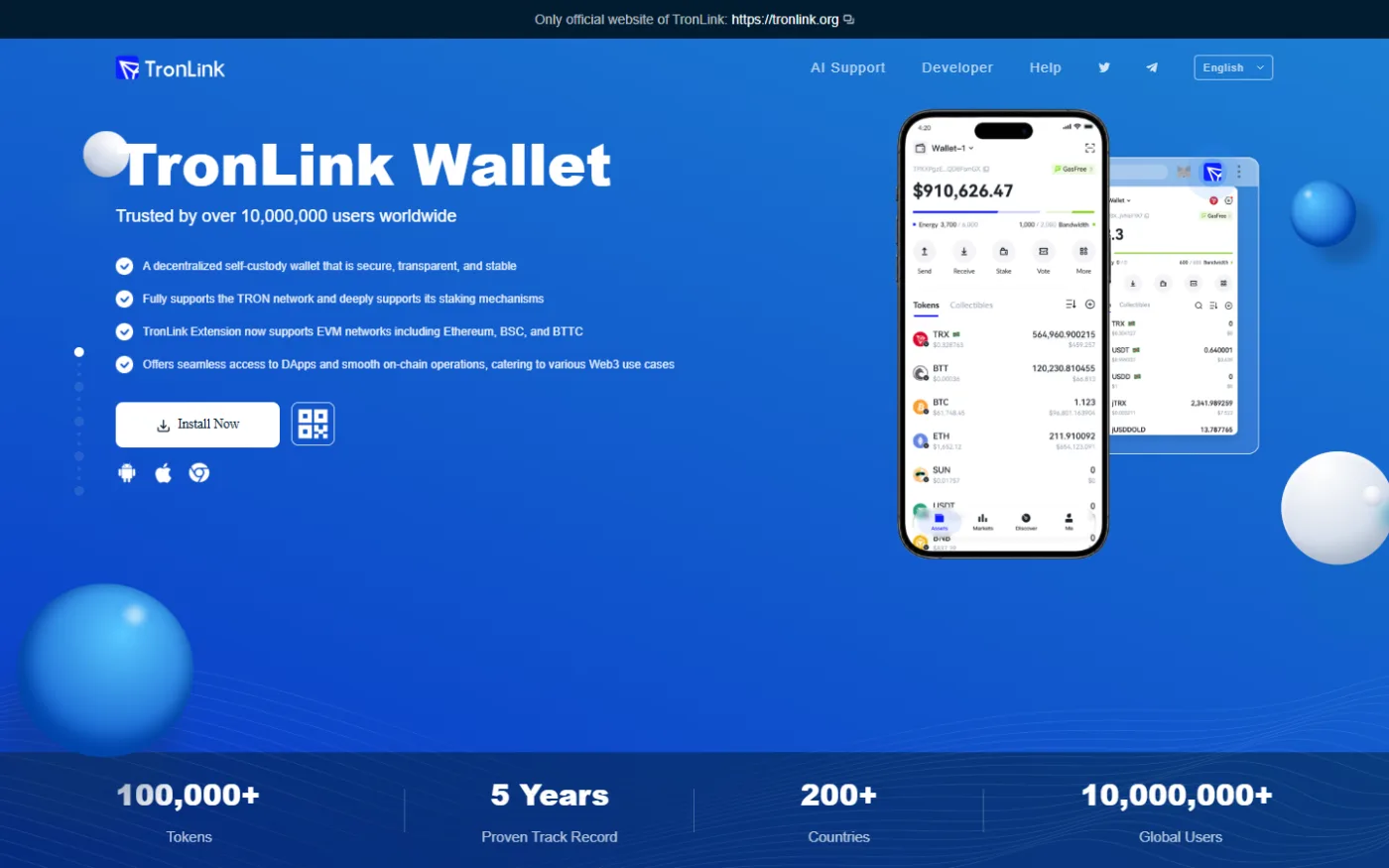
TronLink. Named in TRON's documentation as a browser extension and mobile wallet. CoinGecko's article last updated on June 11, 2024, states that it supports TRX, TRC-10, TRC-20, and TRC-721 with in-wallet staking and was audited by SlowMist.
-
Trust Wallet. Multi-chain wallet. The wallet's own glossary states that it supports TRON network and TRC-20 tokens like USDT, and warns against transferring TRC-20 USDT to the address on the other network which can cause permanent loss. CoinGecko's 2024 article reports a 2022 vulnerability of this wallet where $170,000 worth of funds were lost but later reimbursed.
-
Others mentioned in sources. imToken, TokenPocket, Guarda, Cobo, and Bitpie are listed in TRON's documentation, while Klever and TotalSig are listed in CoinGecko's article and the article reports a 2023 Klever hack tied to a key-generation flaw in earlier versions.
Eco's article, updated in October 2026, compares TronLink, Trust Wallet, Bitget Wallet, OKX Wallet, Ledger, Trezor, MetaMask, and Atomic Wallet, however, Eco is a vendor, and many of the capabilities listed are self-reported. Interfaces of the wallets were not tested for this article.
Hardware and Cold Wallets
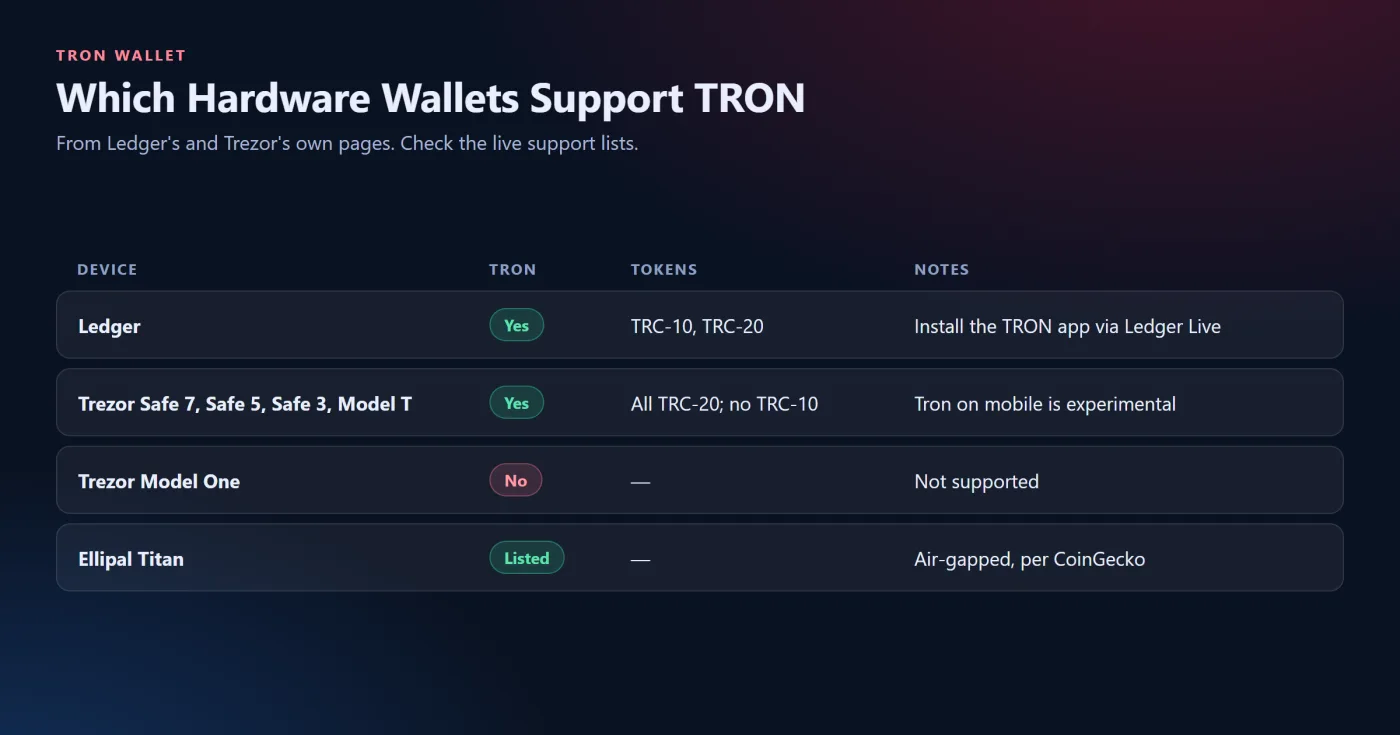
The Ledger's webpage states that it supports TRC-10 and TRC-20 tokens, and it is set up via Ledger Live where you need to install the TRON application on the device, create the account and receive the tokens. Trezor's guide states that Safe 7, Safe 5, Safe 3, and Model T support Tron while the Model One doesn't. It also states that Suite supports all TRC-20 tokens like USDT but doesn't support TRC-10, and Tron on mobile is experimental. CoinGecko's article also lists Ellipal Titan as an air-gapped solution and Ledger Stax as a TRX-supported device.
Paper Wallets
TRON documentation defines paper wallet as a printed key and address. However, the sources read do not describe the process of generating a paper wallet and its risks, so it should be approached cautiously since the key generated on infected or online device may be compromised and a lost paper cannot be recovered.
How the USDT TRC-20 Fee Works
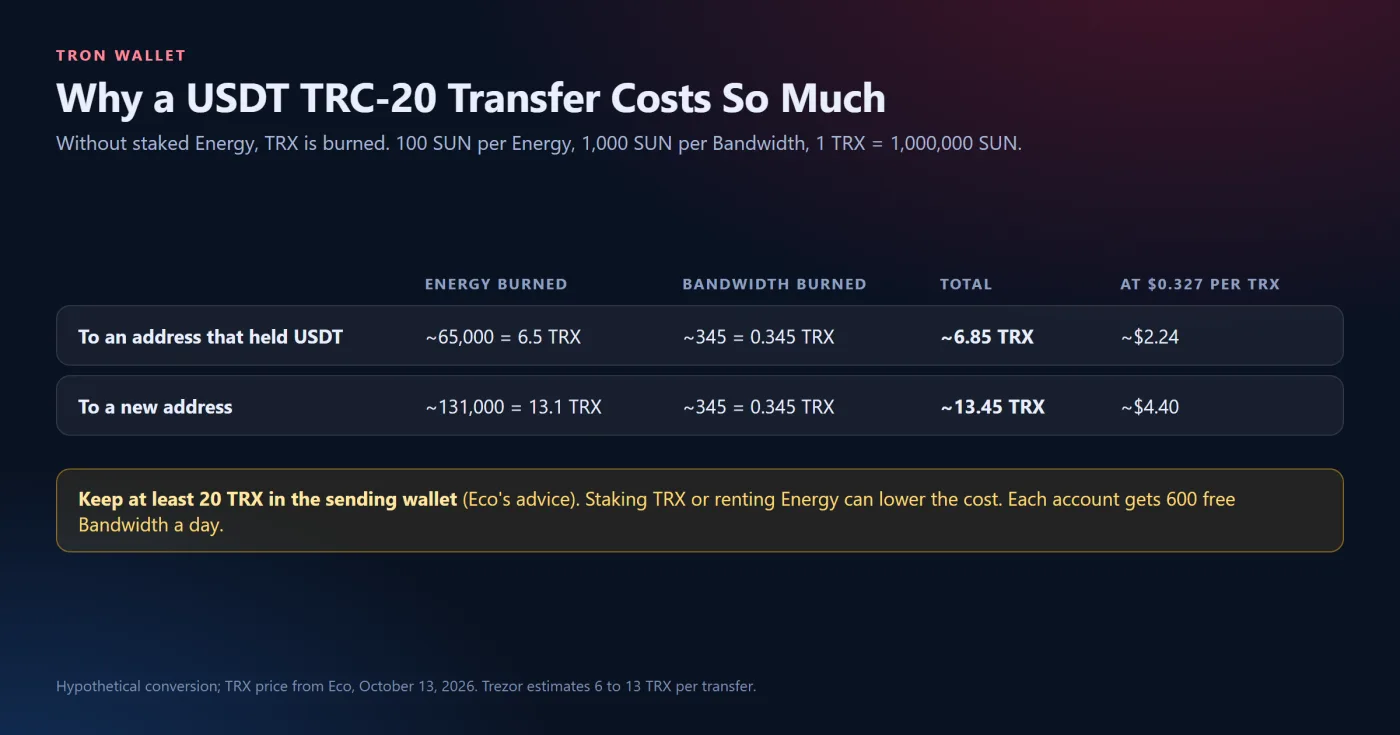
According to the GetBlock fee-model page, every transaction utilizes Bandwidth and Energy and the missing resources are covered by burning TRX. Each account has 600 free Bandwidth per day, transfer of USDT uses approximately 345 Bandwidth and about 65,000 Energy to the address that has previously stored USDT, or about 131,000 Energy to a new address. Energy burns for 100 SUN each and Bandwidth for 1,000 SUN each where 1 TRX equals 1,000,000 SUN. Staking TRX generates Energy, unstaking has 14-day period, and Energy can be rented from service providers. This page doesn't contain the publication date, so its parameters should be verified through TRON's chain parameter query.
Trezor's guide provides the estimate of 6 to 13 TRX per USDT transfer and 1 TRX one-time fee for the first transfer to a new address; however, the GetBlock's page doesn't contain the activation fee information.
A Hypothetical Fee Conversion
This is an illustration, not a quote. Eco's article put TRX price at $0.327 on October 13, 2026. At that price 6.85 TRX would cost approximately $2.24 and 13.45 TRX would cost approximately $4.40. So a 10 USDT transfer to a new address would cost much more than usual 1 to 2 USDT fee of the exchange withdrawal on Binance, Kraken, and OKX, which are self-reported by Eco. Eco advises keeping at least 20 TRX in the sending wallet.
Safety Checks
-
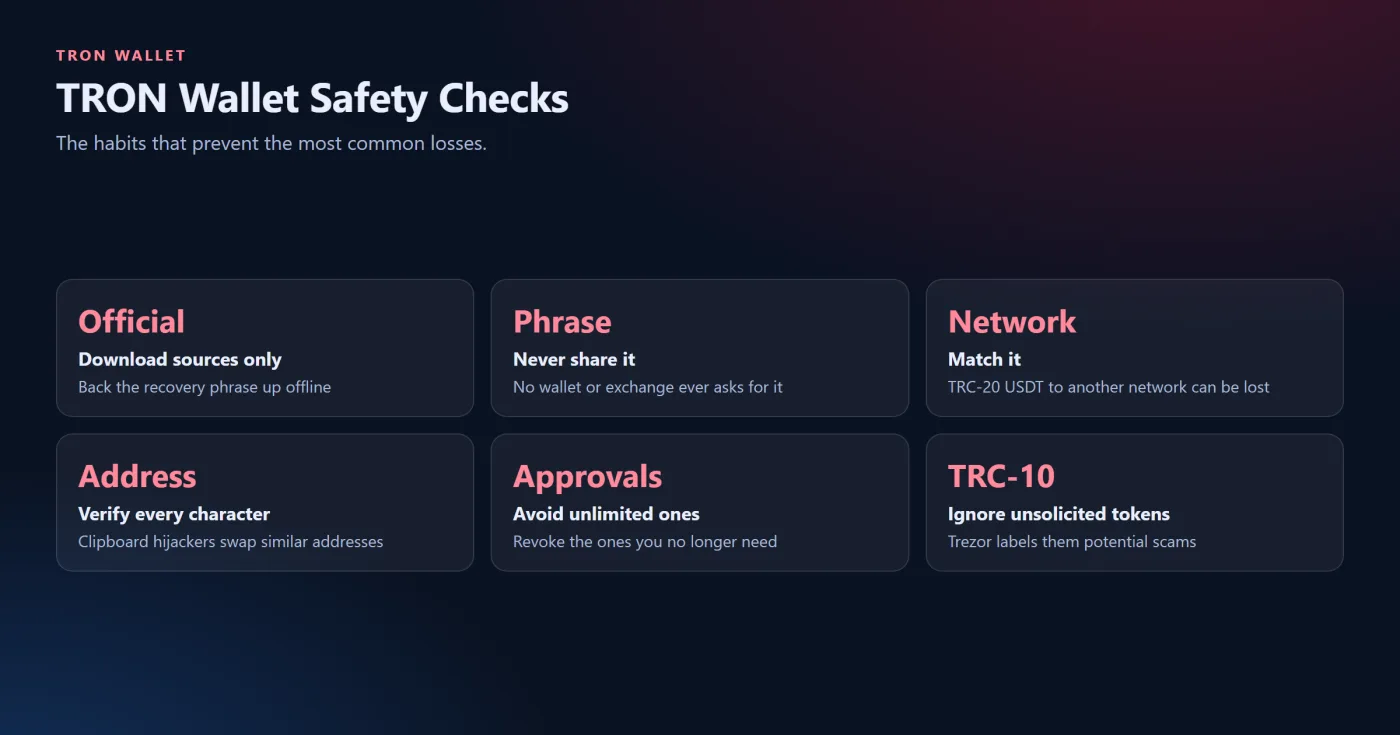
Only download wallets from the official websites as advised by TRON's documentation, and back up the recovery phrase offline.
-
Never enter the recovery phrase on the website or send it to the support. The legitimate wallet or exchange never asks for it.
-
Match the network. Transfer of TRC-20 USDT to the address on another network can cause funds' loss.
-
Always verify the full address since Eco warns that clipboard hijacking could swap similar-looking addresses.
-
Check the token approvals. TRON documentation states that approval lets the spender to move tokens with value up to the approved limit, so the unlimited approvals should be avoided and unnecessary ones should be revoked.
-
Ignore unsolicited TRC-10 tokens. Trezor labels incoming ones as potential scams.
Wallet Lookup and Android or iOS Apps
Since the address is public, the block explorer would be able to show balance and transactions of any TRON address without connecting the wallet to it. The sources read do not describe the particular explorer features, and there should be no request for the recovery phrase from it. As for Android and iOS, TRON documentation lists TronLink, TokenPocket, and Trust Wallet as mobile wallets, and each application's official store listing should be verified.
What to Check Live
-
Support for TRC-20 USDT on the current version of the wallet.
-
Cost of Energy and Bandwidth and the current TRX price.
-
Hardware model support for TRON and TRC-20.
-
Recipient address being on TRON and holding USDT before.
-
At least small balance of TRX available for fees.
This article is educational and is not investment advice. Crypto involves risk of loss, and each reader should verify live information.
Related guides


 Scroll to top